FSX review
FSX FAQ
FS9 aircraft in FSX
Simobjects tutorial
What is FS2004?
737 quick guide
Crosswind landing
FAQ (FS2004)
Aviation Terms
Callsign List
NATO Alphabet
What is AI Traffic ?
FS2004 - How to..?
Install addons
Install AI aircraft
Install AI fightplans
|
Flight Simulator Guide / Guides / Simobjects tutorial
Do you want to do something else than flying?
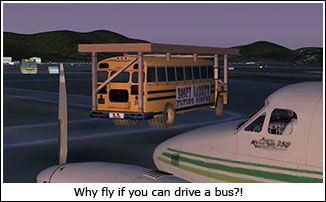 In FS2004, it was possible to make AI aircraft flyable. But in FSX, there is more than only AI air traffic. Ships, ferries, vehicles and even animals are now part of the AI system. Wouldn't it be nice to drive the schoolbus from the Loopy Larry mission? Not only would it be kinda funny to drive around in a schoolbus on your favorite airport, but you can even redo the mission in a multiplayer session! In FS2004, it was possible to make AI aircraft flyable. But in FSX, there is more than only AI air traffic. Ships, ferries, vehicles and even animals are now part of the AI system. Wouldn't it be nice to drive the schoolbus from the Loopy Larry mission? Not only would it be kinda funny to drive around in a schoolbus on your favorite airport, but you can even redo the mission in a multiplayer session!
Well, it's certainly possible, but you have to make a few modifications in FSX. In case you like to use the simobjects in a multiplayer session, everyone connected will need to make the same modifications to FSX, otherwise FSX will replace the simobject with a default aircraft. Below, you'll see instructions on how to proceed. It's not that hard really, but if you have questions, feel free to ask them on our forum.
1. Go to \Documents and Settings\<user name>\Application Data\Microsoft\FSX\
2. Open the file fsx.cfg
3. Search for the line that starts with "User Objects=" and replace this line with this:
User Objects=Airplane, Helicopter, Boat, GroundVehicle, Animal
save the file
4. Go to
\Program Files\Microsoft Games\Microsoft Flight Simulator X\SimObjects\GroundVehicles\FuelTruck\
5. You'll see a few folders and a file called "sim.cfg". Now, this vehicle is actually allready 'flyable' since we've changed that line in the fsx.cfg. The reason for going to this folder is that you need the "panel" folder. In order to appair in the aircraft selection menu, simobjects must have a "panel" folder. Now you can copy this "panel" folder to any simobject you want.
If you want to hear engine sound (vehicles only), you have to go again to the FuelTruck folder as I described above. Copy the "soundai" folder to a temporally folder. After that, change the folder name to "sound". Inside the folder, you'll see four .wav sound files and a file called "soundai.cfg". Change the filename to "sound.cfg". Now you can copy this sound folder to any vehicle you want.
Loopy Larry's schoolbus and the Jet Truck (folder names: VEH_Larrys_schoolbus and VEH_jetTruck) do have their own sound files inside the "soundai" folders. For them, you can do the same, copy the "soundai" folder to a temporally folder, change the "soundai" folder to "sound" and the "soundai.cfg" file inside to "sound.cfg". Now copy the "sound" folder back to either one of the vehicles folders and overwrite if windows asks you.
If you're not sure where the folders are located: On most windows configurations, everything is installed on the C: drive. So go to the windows explorer (not internet explorer), you'll find it in the program group (start -> programs -> Accessories -> Windows Explorer). Then, click on "My Computer", click on "Local Disk (C:)". Now you should be able to see the "Program Files" and "Documents and Settings" folder.
|
|







